Flunqero is your pocket interpreter for iPhone, iPad, and Apple Watch. Speak, listen, or
point your camera — translation runs on your device, so it keeps working when your signal
doesn’t.
Talk, scan, or show the card — translation on every screen above runs on your device,
signal or not.
Free to start — no account
Works in airplane mode
iPhone · iPad · Apple Watch
How it works
Three steps. No signal required.
If you can take a photo, you can use Flunqero. Nothing to set up, nothing to learn — and
once your language is set up, airplane mode changes nothing.
1
Before you fly, get ready
Pick your destination, then tap Get ready. Flunqero sets your language and currency and downloads the language pack. Open Talk once while you still have signal too — each language fetches its speech model the first time you use it.
2
On the ground, talk or point the camera
Hand your phone over for a two-way conversation, catch an announcement with live captions, photograph a menu, or point the camera at a sign or a label.
3
When it really matters, show the card
A full-screen allergy or emergency card in the local language — with Yes/No buttons so the person reading it can answer you back.
Free download — unlimited translation in every language Apple’s on-device engine supports.
What Flunqero does
Your pocket interpreter for the whole trip.
Not just words — Flunqero understands the situation. Ordering food, catching your stop,
reading signs, handling money, and getting understood when it really counts.
Talk — a real two-way conversation
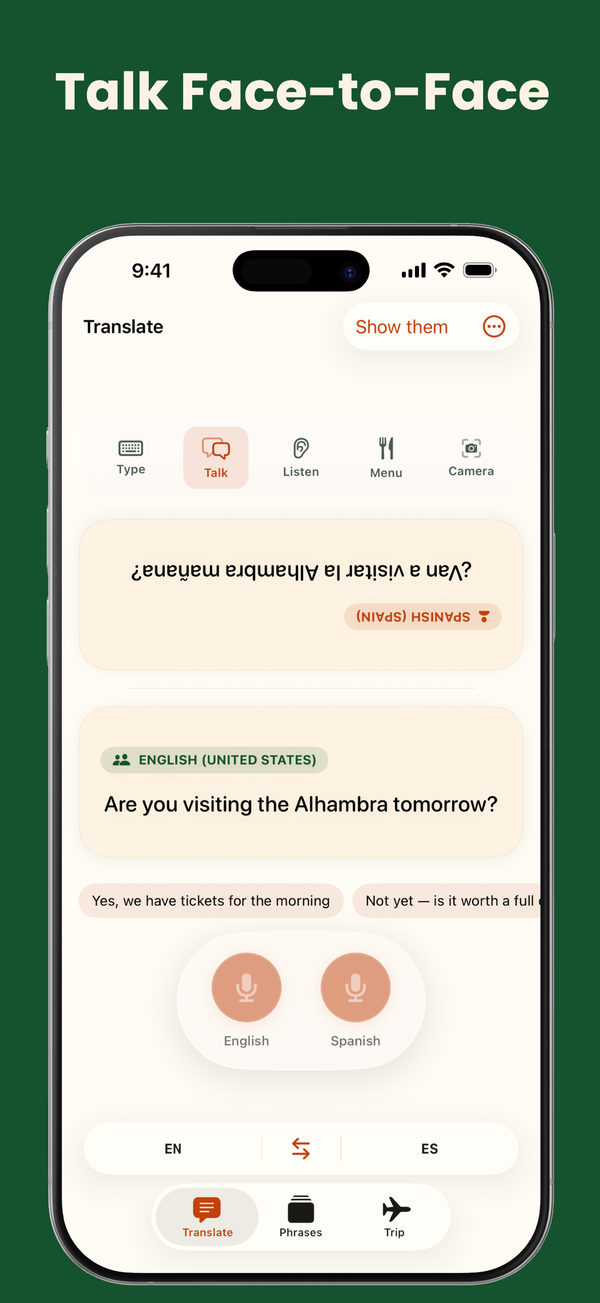
Flunqero tracks whose turn it is, so you can hand your phone across the counter and the other person answers with a tap — or turn on Hands-free and it picks up which language was spoken. Or use Type to write something out — it translates your words back so you can check the meaning — then show it big or have it spoken aloud.
Listen — catch what was just said
Live translated captions for platform announcements and fast talkers. Add your stop or your hotel to the watch list and your phone buzzes the moment it’s said.
Menu — photograph it, read it
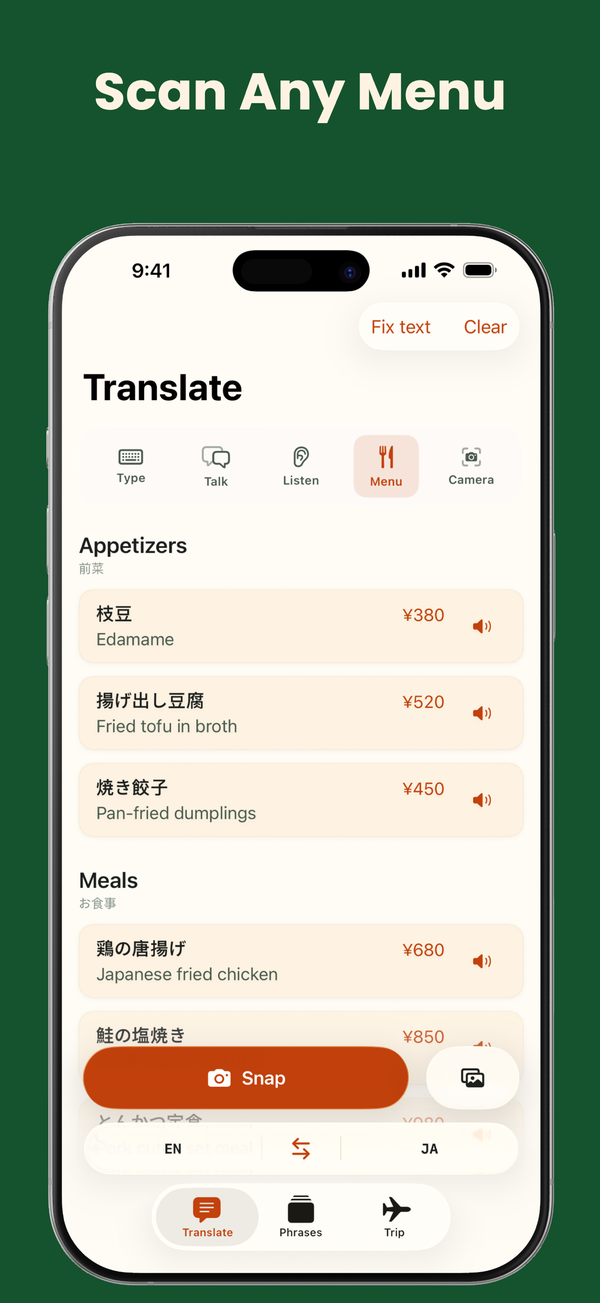
Photograph the menu page by page and read it in your language, with sections, dishes, and prices still lined up where they were. Tap a dish you don’t recognize to find out what it is — the built-in dish dictionary is always there, and free users get three AI dish briefings a day on top (Apple Intelligence, iPhone 15 Pro or newer).
Camera — signs, labels, screens
Point at a street sign, a station board, or the back of a packet and read the translation right on top of the words.
Allergy and emergency cards
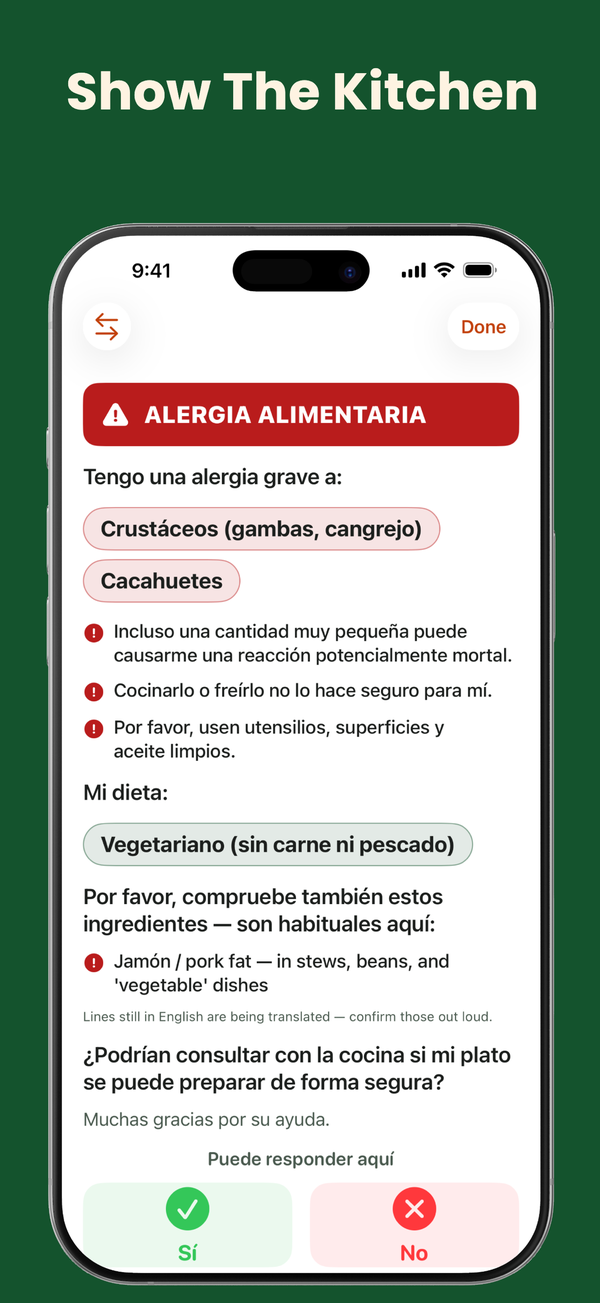
A clear full-screen card about your allergies and diet in the kitchen’s language, with warnings about hidden ingredients and Yes/No buttons for staff. Show it or print it as a PDF, and tap “What this says” to read it back in English before you hand it over. Your first language is free, always — Pro adds all 16. Outside English the wording is AI-drafted rather than professionally reviewed, and the card says so — always confirm out loud. Emergency cards are always free.
Trip — money, manners, answers
Check any price in your own money, offline — exchange rates refresh whenever you have signal. Pro adds Know before you go — etiquette, tipping, and market know-how for 45 destinations, saved before you fly, plus tipping guidance for the bill — and Ask anything for “is tap water safe?” moments, both on Apple Intelligence (iPhone 15 Pro or newer).
When you’ll reach for it
Find your moment.
These are the four situations travelers open Flunqero for. If one of them is yours, it’s a
free download away.
“They’re talking to me and I’m lost”
A pharmacist, a taxi driver, a hotel desk at midnight. Hand your phone over and take turns — or run Listen and read what’s being said as it’s said.
“I can’t read this menu”
Photograph the whole thing and read it in your language, layout intact. Tap the dish you don’t recognize and find out what it is before you order it.
“I can’t eat this — and I can’t explain why”
Show the kitchen a full-screen allergy card in their language, hidden ingredients flagged, with Yes/No buttons so they can answer you. Free in your first language. Outside English the wording is AI-drafted, so confirm out loud too.
“There’s no signal down here”
Basements, metros, mountain roads, planes, and roaming switched off. Download your language and open Talk once before you go, and translation keeps working at zero bars.
iPhone, iPad, and Apple Watch. On-device, in sync.
Translation, speech, and AI answers run on your device with Apple’s on-device
intelligence — no account, no tracking. Saved phrases follow you across iPhone and iPad
over iCloud, and once synced, your allergy card and saved phrases live on your wrist,
alongside ready-made travel phrases in 14 languages, for
when your phone is out of reach.
Every way of translating — talk, listen, menu, camera, type — costs nothing, in every
language Apple’s on-device engine supports. Pro adds the travel toolkit.
Free
No account. No signal required.
Unlimited Talk, Listen, Menu, Camera & Type translation
Offline language packs
Your first allergy-card language
Emergency phrase cards
Offline price checker
Pronunciation practice & menu scans, uncapped
Three AI dish briefings a day (Apple Intelligence)
Prefer to pay once? Lifetime is $39.99. Already
used your free trial? A $3.99 Trip Pass covers 30 days.
Ask anything, Know before you go, tipping guidance, dish briefings, Talk’s reply suggestions, and tone rewriting in Type and Talk run on Apple Intelligence, so they need an iPhone 15 Pro or newer with Apple Intelligence turned on. Everything
else — translation, speech, menus, allergy cards, emergency cards — works on any iPhone or
iPad running 26.0.
Guides
Guides for your next trip.
Walkthroughs for the jobs people bring to Flunqero: talking with locals, reading menus
and signs, translating offline, the Apple Watch, and choosing between translators.